한국어 · English
Chaekgalpi Tools › Photos
ID & Passport Photo Cropper
Crop a photo to passport size (35×45 mm, 413×531 px), resume size (30×40 mm) or US visa size (2×2 in) and tile copies on a 4×6 in print sheet. Free, in your phone or PC browser; photos are never uploaded.
Chaekgalpi Tools are made by the person who runs Chaekgalpi Library, a Korean-language web service for keeping a reading log. About Chaekgalpi Library (Korean) →
How to use
- Press "Open in browser". Works in Chrome, Edge, Safari, Samsung Internet and Whale on phones and PCs. No install, no sign-up.
- Pick a size: Korean passport / ID 35×45, resume 30×40, small 25×30, 50×70, US visa 2×2 in, or a custom size in mm. Choose 300 dpi (online submission) or 600 dpi (printing) and the output pixel size (413×531 px for passports) is shown right away.
- Choose or drop a photo, or on a phone tap "Take a photo".
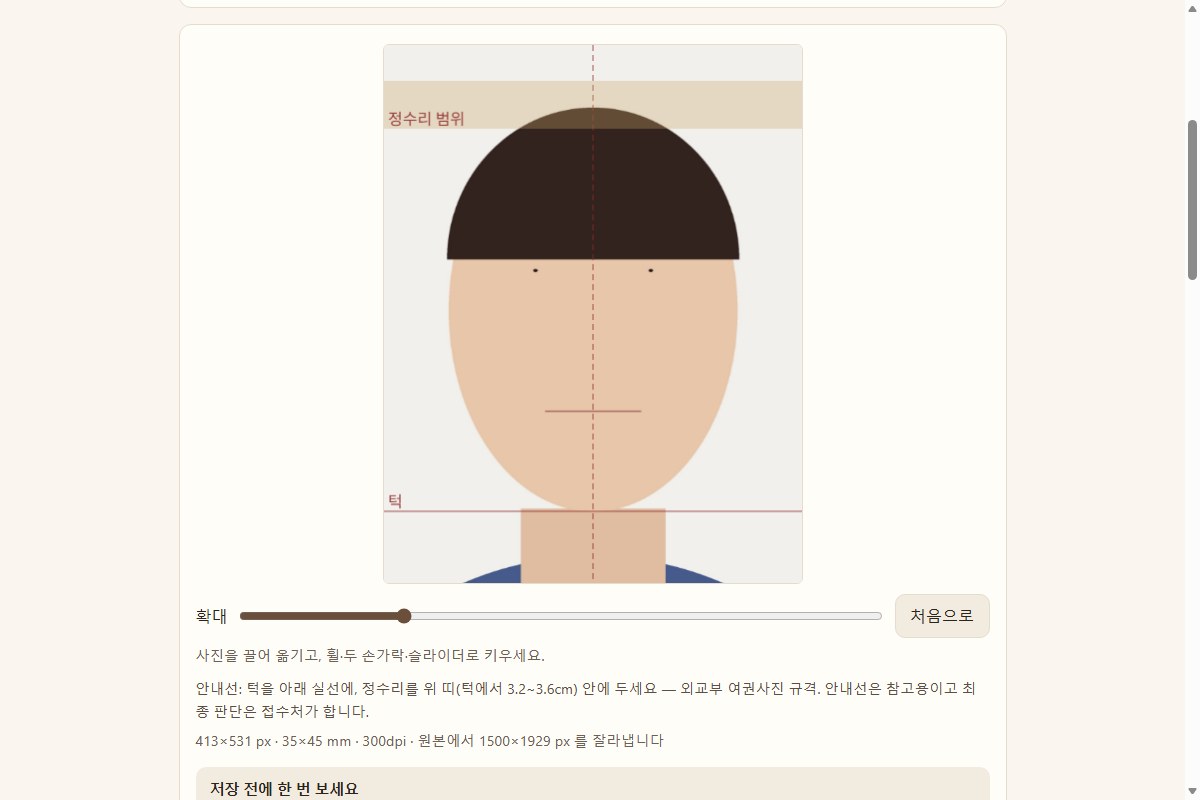
- Drag the photo and zoom with the wheel, two fingers or the slider. For 35×45 the chin line and crown band (head 3.2–3.6 cm, Korean MOFA rule) are overlaid.
- Press "Save single JPG" or "Save 4×6 print sheet" (8 passport photos per sheet, optional cut lines).
Features
- Photos are processed inside the browser and never uploaded. Results are freshly saved JPGs with no metadata (GPS location, camera, date).
- Korean passport, ID card and driver's license all use 35×45 mm, so one file serves all three. The US visa preset follows the Department of State rule (head 1 to 1 3/8 in, 600×600 px).
- The preview is a downscaled copy; saving crops from the full-resolution original. A warning appears when the original is smaller than the output.
- A pre-save checklist (white background, neutral expression, within 6 months, no shadows or glare), a size table, common passport-photo mistakes and an FAQ are on the page.
- On a phone, "Add to Home screen" keeps it like an app that opens even offline.
Good to know
- Backgrounds are not removed. Korean passports reject erased or replaced backgrounds, so shoot in front of a plain white wall.
- Guides are a reference only; the issuing office makes the final call. Resume and other non-passport sizes are conventions, so follow the requester if they state a size.
- If a file-size limit applies, run the saved file through Photo Size Reducer.
- iPhones convert HEIC photos to JPG when you pick them. If a PC browser cannot open HEIC, convert to JPG first.
Frequently asked questions
What exactly is the Korean passport photo size?
35×45 mm with the head (chin to crown) between 3.2 and 3.6 cm, a plain white background, taken within the last 6 months, and no retouching, AI editing or background replacement (Ministry of Foreign Affairs). At 300 dpi that is 413×531 px. Korean ID cards and driver's licenses use the same size.
Does it remove the background?
No. It only crops and resizes. For Korean passports an erased or replaced background is itself a reason for rejection, so shoot in front of a plain white or light wall.
Are my photos uploaded?
No. Cropping and saving happen inside the browser you are using and photos are never sent anywhere. The saved file is redrawn from scratch, so all metadata including GPS location is removed. It works offline after the first visit.
How do I get prints?
Save the 4×6 print sheet and order it as one 4×6 in (10×15 cm) print with any auto-fit or fill option turned off; a passport-size sheet holds 8 photos. At home, print on 4×6 paper at 100% scale. Turn on cut lines to make trimming easier.
300 or 600 dpi?
dpi is dots per inch. The same 35×45 mm is 413×531 px at 300 dpi and 827×1063 px at 600 dpi. 300 dpi is enough for online submission; 600 dpi prints sharper but needs a larger original. A warning appears when the original is smaller than the output.
Can I use a phone photo?
Yes. Use "Take a photo" or pick one from your album. Avoid arm's-length selfies, which distort the face; have someone shoot from about 1.5 m in front of a white wall. If a file-size limit applies, run the saved file through Photo Size Reducer.
Send feedback
Tell us what doesn't work, what's awkward, or what you wish it did. No sign-in needed. Every message is read, in English or Korean.
We don't keep anything that identifies the sender (IP, sign-in) · Privacy policy (Korean)
Other tools in this group
- Photo Organizer — Sorts phone, camera and messenger photos into folders by the date they were taken, converts HEIC to JPG and filters out duplicates. Works offline (except the update check, which can be turned off) and has undo.
- Photo Resize — Reduce photo file size on your own PC. Pick a target such as 500KB or 1MB and every photo in a folder is saved at the best quality that fits. Originals stay untouched and location data is removed.
- Photo Size Reducer (Browser) — Reduce photo file size in your phone or PC browser. Pick 200KB, 500KB or 1MB and each photo is saved at the best quality that fits. Nothing is uploaded and location data is removed.