한국어 · English
Chaekgalpi Tools › E-books
TXT to EPUB (Browser)
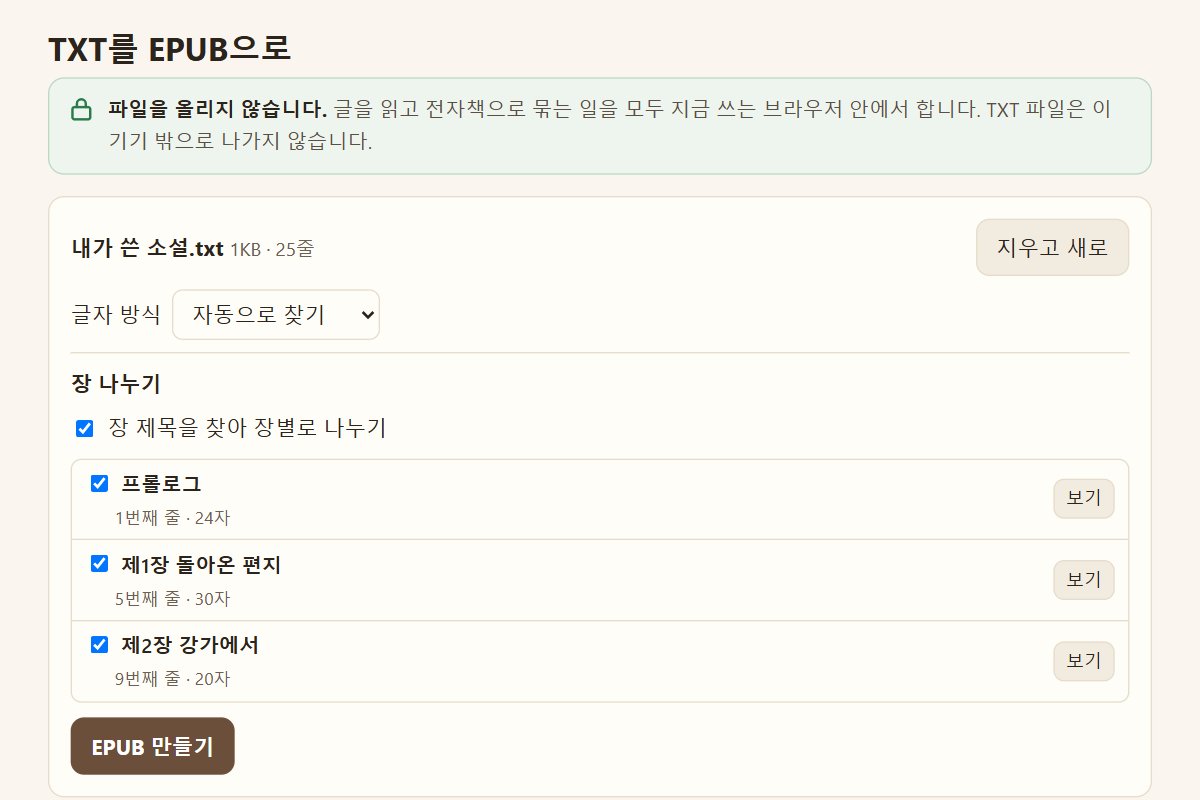
Convert a TXT file to EPUB in your phone or PC browser. The encoding is detected so text does not garble, chapter headings become a table of contents, and the file is never uploaded.
Chaekgalpi Tools are made by the person who runs Chaekgalpi Library, a Korean-language web service for keeping a reading log. About Chaekgalpi Library (Korean) →
How to use
- Press "Open in browser". Works in Chrome, Edge, Safari, Samsung Internet and Whale on phones and PCs. No install, no sign-up.
- Pick or drop a TXT file. The encoding (UTF-8, EUC-KR, UTF-16 and others) is detected and the opening is shown. If it looks garbled, change the encoding.
- Check the chapter list. Untick a wrong heading, or add a missing one by line number.
- Choose how paragraphs are split, enter the title and author, and add a cover image if you have one.
- Press Make EPUB, then Save EPUB.
Browser or Windows version
For one TXT file on a phone, this page is enough. To join episode files into one book or write your own heading rule, use the Windows version.
Good to know
- Files are processed inside the browser and never uploaded.
- One TXT file makes one EPUB2 file. Documents with images (HTML, DOCX) are out of scope.
- Use it for your own writing or texts whose copyright has expired.
- No font is set, so the font and size chosen in your reader app apply.
- A phone may run slowly or out of memory on very large files.
Frequently asked questions
Is my TXT file uploaded?
No. Reading the text and building the EPUB both happen inside the browser you are using, and the file is never sent anywhere. After the first visit it works offline as well.
What if the text looks garbled?
TXT files are saved in different encodings and do not say which one. The page detects it and shows the opening. If the preview looks wrong, choose another encoding; the preview and chapter list are rebuilt right away.
What if chapters are split wrongly?
Untick a wrong heading and that line joins the previous chapter. To add a missing chapter, note the line number on the left of the preview and enter it under Add as chapter.
Where does the EPUB go on a phone?
Android usually puts it in Downloads. Safari on iPhone saves to the Downloads folder in the Files app by default. Downloads may be blocked inside messenger app browsers, so reopen the page in Chrome or Safari if that happens.
Send feedback
Tell us what doesn't work, what's awkward, or what you wish it did. No sign-in needed. Every message is read, in English or Korean.
We don't keep anything that identifies the sender (IP, sign-in) · Privacy policy (Korean)
Other tools in this group
- TXT to EPUB — Turns a plain-text file into an EPUB e-book without garbled characters. Chapter headings are detected and a table of contents is built.
- Ebook Cover Maker — Type a title, author and publisher name and get an e-book cover that passes self-publishing platform checks, inserted straight into your EPUB. A compliance tool, not a design tool.
- EPUB Font Unlock — Removes the hard-coded fonts from an EPUB whose typeface will not change on your e-reader, so you can read it in the font you choose. It does not handle DRM-protected books.