한국어 · English
Chaekgalpi Tools › Writing
Character Counter & Manuscript Pages
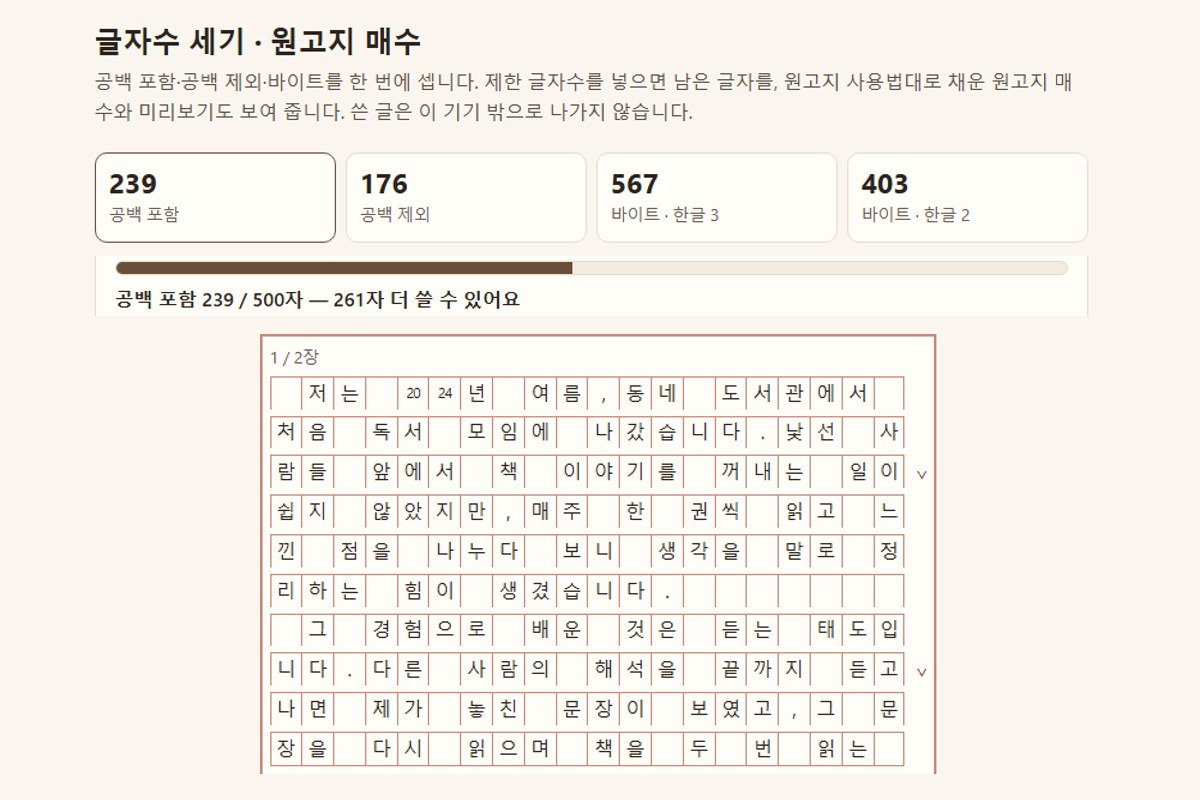
Count characters with and without spaces and in bytes (Korean as 2 or 3 bytes), track a length limit, and see how many Korean manuscript-paper sheets your text fills. Your text never leaves the browser.
browser tool · Updated 2026-10-19
Chaekgalpi Tools are made by the person who runs Chaekgalpi Library, a Korean-language web service for keeping a reading log. About Chaekgalpi Library (Korean) →
How to use
- Press "Open in browser" and type or paste your text. Characters with and without spaces, bytes, words, paragraphs and manuscript pages appear immediately.
- Pick a length limit (500, 1,000 or 1,500 characters, a range, or your own number) and a counting basis. The remaining count updates as you type.
- Under Manuscript preview, choose 200- or 400-cell Korean manuscript paper (wongoji) to see the text laid out cell by cell, and print it or save it as PDF.
Features
- Manuscript pages are counted by actually filling the grid with the common wongoji conventions (blank first cell for each paragraph, two digits or lowercase letters per cell, no blank cell after a period or comma, line-end punctuation shares the last cell), not by dividing by 200.
- Bytes are shown both ways: Korean as 2 bytes (EUC-KR style) and as 3 bytes (UTF-8).
- Counting happens in your browser. Text is never uploaded and is saved only in this browser.
- Add it to your phone's home screen to open it like an app, even offline.
Good to know
- Wongoji layout is a convention, not an official orthography rule, so follow your school's or contest's instructions if they differ.
- Application sites differ in how they count spaces, line breaks and bytes. Check the final text in the site's own input box.
Frequently asked questions
Is my text uploaded?
No. Counting happens inside your browser and the text is never sent anywhere. Your draft is saved only in this browser and Clear removes it.
Why are there two byte counts?
Korean text is stored as 2 bytes per character in EUC-KR style systems and 3 bytes in UTF-8. If a form limits bytes without saying which, staying under the 3-byte count is the safe choice.